

Overview#
It has already been several years since LLMs began to be widely adopted in industry.
Not long ago, we were emphasizing the importance of Hybrid Cloud and advocating for MSA(Microservices Architecture) and now, with LLMs entering the picture, the importance of infrastructure has become even more pronounced.
Compared to typical Kubernetes workloads, LLM workloads(especially multi-node inference and training) have fundamentally different networking characteristics.
In this post, we will explore networking architectures for multi-node LLM inference and training, with a focus on using InfiniBand SR-IOV.
MultiNode LLM Workload#
LLM workloads are complex and consist of many layers.
Training involves collecting and curating massive datasets, tokenizing them, computing next-token probabilities using Transformers, calculating the difference between predictions and ground truth, and then updating weights via backpropagation.
This entire process is repeated dozens to hundreds of times over the full dataset.
Inference on the other hand, uses the trained model weights as-is to generate outputs for new inputs.
Even then, with models containing tens or hundreds of billions of parameters, the computational cost remains significant.
So, what should we consider in order to achieve optimal performance for such demanding LLM workloads?

In contrast to typical Kubernetes workloads, which consist of short request/response patterns where each pod operates independently,
LLM Inference are characterized by:
- Long-lived and continuous stream
- Synchronized collective communication between GPUs (via NCCL – NVIDIA Collective Communications Library)
- GPU execution following the SIMT (Single Instruction, Multiple Threads) model, where all threads execute in lock-step, meaning the next instruction is issued only after all threads complete the current one
In addition, LLM training and tuning workloads feature:
- Each step being executed using All-Reduce, where values computed across multiple nodes are aggregated and then broadcast back to all nodes
Because of these characteristics, dozens of packets are constantly exchanged, and even a single delayed packet can impact the entire training step.
As a result, for LLM workloads, network jitter is often more harmful than raw latency.
If even one node experiences a spike in RTT (Round Trip Time), other GPUs may remain idle while waiting.
In severe cases, this can trigger NCCL timeouts, causing the entire job to fail.
For inference, network instability primarily degrades performance.
For training or fine-tuning, however, it can cause long-running jobs—lasting hours or even days—to fail outright, making careful network design critical.
Latency vs Jitter
Latency: The time it takes for data to travel from one endpoint to anotherJitter: Variability in packet delay; packets arrive at inconsistent and irregular intervals
In short:
- Traditional Kubernetes architectures emphasize Ingress/Egress (North-South) traffic, APIs, and service meshes
- Multi-node LLM workloads, on the other hand, rely heavily on Pod-to-Pod (East-West) communication
on Kubernetes(Openshift)#
Now let’s examine Kubernetes networking more closely.
By design, Kubernetes pods do not manage the physical network directly. Instead, they operate on an abstracted overlay network layer.
Running on an overlay network means:
- The overlay MTU may not match the physical network MTU
- Additional encapsulation headers are added, introducing overhead
In other words, the probability of network jitter increases.
While this abstraction allows pods to communicate via IP without worrying about the underlying network,
multi-node LLM workloads require fine-grained control over networking details such as:
- NIC type
- Switch topology
- RDMA capabilities
SR-IOV#
SR-IOV (Single Root I/O Virtualization) leverages NIC hardware features such as queues, offloading, and DMA to minimize software layers in the packet path. This significantly reduces latency, overhead, and jitter.
For workloads like LLM serving—where low latency and consistent throughput are critical—enabling SR-IOV is a strong option to consider.
Reference : A Quick Dive into Network Virtualization(feat. DPDK, SR-IOV)
Infiniband#
InfiniBand is a networking interconnect technology designed for high bandwidth and low latency in HPC environments.
The latest versions support speeds of up to 400 Gbps, making InfiniBand effectively essential for high-performance multi-node LLM workloads.
However, since NVIDIA acquired Mellanox, InfiniBand has become a largely proprietary ecosystem with limited competition and high costs. In the past, InfiniBand clearly outperformed Ethernet, but modern Ethernet bandwidth has largely caught up.
As a result, some now question whether the cost and vendor lock-in of InfiniBand are still justified.
RDMA(Remote Direct Memory Access)#
Now let’s take a closer look at RDMA, the technology that made InfiniBand the dominant force in distributed computing.
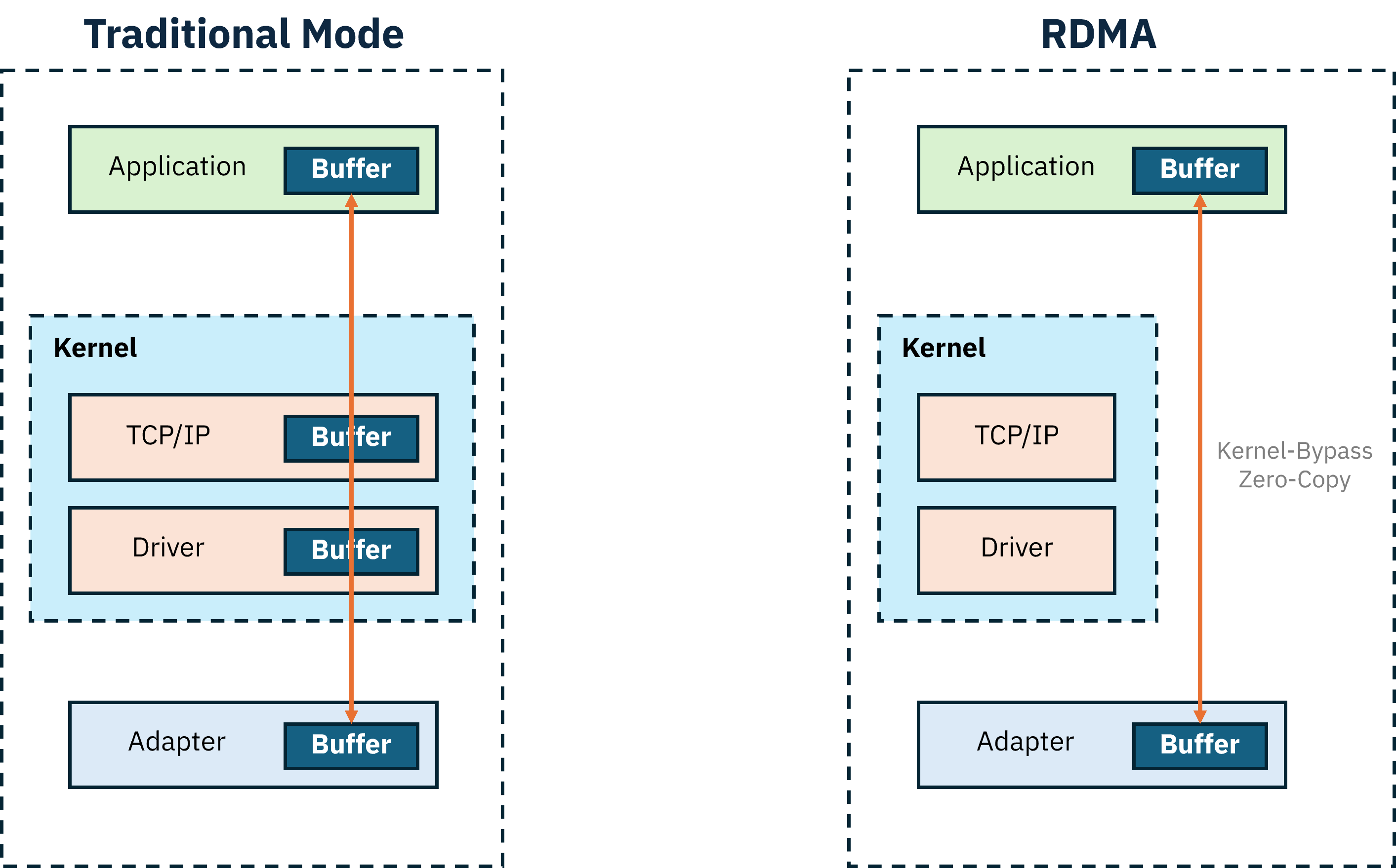
RDMA (Remote Direct Memory Access) allows data to be transferred directly from the memory of one server to another without CPU or OS involvement.
This enables:
- Zero-copy data transfers
- Kernel bypass, avoiding kernel-space networking stacks
Together, these characteristics maximize performance—making RDMA a critical requirement for multi-node LLM workloads, as discussed earlier.
Naturally, RDMA communication requires that both the sending and receiving NICs support RDMA.
RoCE (RDMA over Converged Ethernet) A protocol that enables RDMA over Ethernet networks
Configuring an InfiniBand Network on OpenShift#
Finally, we’ll move on to hands-on practice:
configuring an InfiniBand-based subnetwork in OpenShift using SR-IOV, and enabling RDMA communication between pods.
1. Checking InfiniBand Devices#
First, verify that the InfiniBand devices installed on the server are detected correctly.
# lspci |grep Infiniband

3c:00.0 Infiniband controller: Mellanox Technologies MT2910 Family [ConnectX-7]
4d:00.0 Infiniband controller: Mellanox Technologies MT2910 Family [ConnectX-7]
5e:00.0 Infiniband controller: Mellanox Technologies MT2910 Family [ConnectX-7]
9c:00.0 Infiniband controller: Mellanox Technologies MT2910 Family [ConnectX-7]
bc:00.0 Infiniband controller: Mellanox Technologies MT2910 Family [ConnectX-7]
dc:00.0 Infiniband controller: Mellanox Technologies MT2910 Family [ConnectX-7]
# ip a
10: ibp60s0: <BRODCAST,MULTICAST,UP,LOWER_UP> mtu 4092 qdisc mq state UP group default qlen 256
link/infiniband 00:00:00:6c:fe:80:00:00:00:00:00:00:7c:8c:09:03:00:ae:4c:1c brd 00:ff:ff:ff:ff:12:40:1b:ff:ff:00:00:00:00:00:00:ff:ff:ff:ff
11: ibp77s0: <BRODCAST,MULTICAST,UP,LOWER_UP> mtu 4092 qdisc mq state UP group default qlen 256
link/infiniband 00:00:00:6c:fe:80:00:00:00:00:00:00:7c:8c:09:03:00:ad:0b:5e brd 00:ff:ff:ff:ff:12:40:1b:ff:ff:00:00:00:00:00:00:ff:ff:ff:ff
...An IPoIB device has a 20-byte hardware address:
- The first 4 bytes represent flags and the Queue Pair number
- The next 8 bytes are the subnet prefix (default:
0xfe:80:00:00:00:00)- The final 8 bytes are the GUID of the InfiniBand port associated with the IPoIB device
2. Checking the Subnet Manager#
InfiniBand networks require an SDN (Software Defined Network) controller that manages the IB fabric.
This controller is called the Subnet Manager(SM).
The SM assigns LIDs (Local Identifiers) to newly added devices and monitors link up/down events and failovers.
An InfiniBand fabric requires at least one SM. Multiple SMs can exist, but only one is active at a time.
The SM can run on an IB switch or on a regular server.
In this setup, we assume that UFM (Unified Fabric Manager) is installed on a dedicated server to manage and monitor the entire fabric.
To check the SM from any node in the InfiniBand fabric:
# sminfo
sminfo: sm lid 1 sm guid 0xe89e4903003xxxxx, activity count 6306612 priority 15 state 3 SMINFO_MASTER
This confirms that the device with LID 1 is acting as the Subnet Manager.
To list InfiniBand switches:
# ibswitches
Switch : 0xfc6a1c0300xxxxxx ports 65 "Quantum-2 Mellanox Technologies" base port 0 lid 6 lmc 0
Switch : 0xfc6a1c0300xxxxxx ports 65 "Quantum-2 Mellanox Technologies" base port 0 lid 5 lmc 0
Switch : 0xfc6a1c0300xxxxxx ports 65 "Quantum-2 Mellanox Technologies" base port 0 lid 63 lmc 0
Switch : 0xfc6a1c0300xxxxxx ports 65 "Quantum-2 Mellanox Technologies" base port 0 lid 97 lmc 0
Switch : 0xfc6a1c0300xxxxxx ports 65 "Quantum-2 Mellanox Technologies" base port 0 lid 42 lmc 0
Switch : 0xfc6a1c0300xxxxxx ports 65 "Quantum-2 Mellanox Technologies" base port 0 lid 64 lmc 0
Switch : 0xfc6a1c0300xxxxxx ports 65 "Quantum-2 Mellanox Technologies" base port 0 lid 3 lmc 0
Switch : 0xfc6a1c0300xxxxxx ports 65 "Quantum-2 Mellanox Technologies" base port 0 lid 7 lmc 0
Switch : 0xfc6a1c0300xxxxxx ports 65 "Quantum-2 Mellanox Technologies" base port 0 lid 4 lmc 0
To view the full topology:
# ibnetdiscoverThis command displays the complete connectivity map of the InfiniBand fabric.
3. Basic Connection Test#
Next, perform a simple test to verify that InfiniBand devices can communicate properly.
On the node acting as a temporary server:
# ibping -S -C mlx5_4 -P 1-C : InfiniBand device name to receive pings-P : Port number
On the client node:
# ibping -C mlx5_2 -P 1 -L 81
...
Pong from test-cluster-3 (Lid 81): time 0.016ms
Pong from test-cluster-3 (Lid 81): time 0.007ms
Pong from test-cluster-3 (Lid 81): time 0.008ms
Pong from test-cluster-3 (Lid 81): time 0.007ms
Pong from test-cluster-3 (Lid 81): time 0.008ms
--- test-cluster-3 (Lid 81) ibping statistics ---
5 packets transmitted, 5 received, 0% packet loss, time 4045ms
rtt min/avg/max = 0.007/0.009/0.016 ms
-C : Client-side InfiniBand device-P: Port number-L : LID of the destination InfiniBand device
Device names and LIDs can be checked using
ibv_devicesandibv_devinfo.
4. Installing Required Operators#
After verifying basic InfiniBand functionality on Linux, we now move on to configuring an InfiniBand pod network on OpenShift.
This guide assumes that OpenShift is already installed and configured.
Test environment:
- Openshift v4.18
- Worker nodes with InfiniBand are bare metal (not VMs)
First, install the Node Feature Discovery (NFD) Operator and create a NodeFeatureDiscovery resource using the default template.
NFD runs daemonsets that label nodes based on detected hardware.
Verify that nodes with InfiniBand devices have the following label: network-sriov.capable=true
Checklist
- InfiniBand devices are visible (
lspci)- SR-IOV is enabled in the BIOS
Once the label is confirmed, install the SR-IOV Operator.
5. Identifying InfiniBand Devices for the Pod Network#
Now identify which InfiniBand devices will be used for the pod network.
Assume there are six InfiniBand devices:
- Four connected to
Fabric1 - Two connected to
Fabric2
We will use the four devices in Fabric1 for the pod network.
5.1 Identifying Vendor and Device ID#
Use lspci to check vendor and device IDs:
# lspci -nn |grep Infiniband

3c:00.0 Infiniband controller: Mellanox Technologies MT2910 Family [ConnectX-7] [15b3:1021] ...
4d:00.0 Infiniband controller: Mellanox Technologies MT2910 Family [ConnectX-7] [15b3:1021] ...
...
Save the vendor:device_id value (15b3:1021).
5.2 Creating sriovOperatorConfig#
Create a SriovOperatorConfig resource using the default configuration.
5.3 Mapping InfiniBand Interfaces#
To identify InfiniBand interface names:
# ls -al /sys/class/net/ib*/device/infinibandIf lshw is available:
# lshw -c network -businfo
BUS info               device        class            Description
===========================================
pci@0000:3c:00.0   ibp60s0     network   MT2910 Family [ConnectX-7]
....
This shows device names and PCI addresses, but not interface names.
Once you know the interface name prefix, use:
# ls -al /sys/class/net/ib*/device/infiniband/mlx5*/device This allows you to correlate interface names with PCI bus information.
Organize the mapping as follows and select the devices to use for the pod network:
ibp188s0 - mlx5_4 - bc:00
ibp222s0 - mlx5_5 - dc:00
ibp60s0 - mlx5_0 - 3c:00
ibp77s0 - mlx5_1 - 4d:00
ibp156s0 - mlx5_3 - 9c:00
ibp94s0 - mlx5_2 - 5e:00
In this guide, we will use the first four devices
6 Creating a SriovNetworkNodePolicy#
apiVersion: sriovnetwork.openshift.io/v1
kind: SriovNetworkNodePolicy
metadata:
  name: mlx-policy
  namespace: openshift-sriov-network-operator
spec:
  resourceName: mlx_test # policy name
  nodeSelector:
    feature.node.kubernetes.io/network-sriov.capable: "true"
  numVfs: 8  # number of vf per node
 nicSelector:
    vendor: "15b3"
    deviceID: "1021"
    rootDevices:
      - "0000:3c:00.0"
      - "0000:4d:00.0"
      - "0000:bc:00.0"
      - "0000:dc:00.0"
    deviceType: netdevice
    isRdma: true
Populate vendor, deviceID, and rootDevices using the values identified earlier.
When this policy is applied, the MachineConfigPool will reboot all matching nodes.
7 Checking vf#
After the MCP process completes, verify that each PF has been split into 8 VFs.
Before VF creation:
# ip a
...
10: ibp60s0: <BROADCAST, MULTICAST, UP, LOWER_UP> mtu 4092 qdisc mq state UP group default qlen 256
  link/infiniband 00:00:09:e8:fe:80:00:00:00:00:00:00:38:25:f3:03:00:90:85:90 brd 00:ff:ff:ff:ff:12:40:1b:ff:ff:00:00:00:00:00:00:ff:ff:ff:ff
...
After VF creation:
# ip a
...
10: ibp60s0: <BROADCAST, MULTICAST, UP, LOWER_UP> mtu 4092 qdisc mq state UP group default qlen 256
  link/infiniband 00:00:09:e8:fe:80:00:00:00:00:00:00:38:25:f3:03:00:90:85:90 brd 00:ff:ff:ff:ff:12:40:1b:ff:ff:00:00:00:00:00:00:ff:ff:ff:ff
  vf 0 link/infiniband 00:00:03:51:fe:80:00:00:00:00:00:00:38:25:f3:03:00:85:1d:ae brd 00:ff:ff:ff:ff:12:40:1b:ff:ff:00:00:00:00:00:00:ff:ff:ff:ff, spoof checking off, NODE_GUID 59:ca:bb:00:97:92:74:5f, PORT_GUID 59:ca:bb:00:97:92:74:5f, link-state disable, trust off, query_rss off
vf 1 .....
If VFs are not created, verify that SR-IOV is enabled in the BIOS.
8 Deploying a sriovIBNetwork#
Now let’s create the pod network.
apiVersion: sriovnetwork.openshift.io/v1
kind: SriovIBNetwork
metadata:
  name: sriov-network-ib-test
  namespace: openshift-sriov-network-operator
spec:
  resourceName: mlx_test
  linkState: enable
  networkNamespace: test
  ipam: |
    {
      "type": "whereabouts",
      "range": "100.100.100.0/1",
      "range_start": "100.100.100.101",
      "range_end": "100.100.100.212",
      "routes": [{
        "dst": "0.0.0.0/0"
      }],
      "gateway": "100.100.100.1"
      }
The ipam section defines the IP range and gateway for pods connected to InfiniBand VFs.
With 4 PFs × 8 VFs, a total of 32 IP addresses are required.
At this point, the SR-IOV–based InfiniBand pod network is fully configured.
9. Deploying a Test Pod#
apiVersion: v1
kind: Pod
metadata:
  name: sriov-demo-pod-1
  namespace: test
  annotations:
    k8s.v1.cni.cncf.io/networks: sriov-network-ib-test
spec:
  container:
  - name: sriov-container
    imagePullPolicy: Always
    image: {REGISTRY}/nvidia/doca/doca:3.1.0-full-rt-host
    command:
    - sleep
    - inf
    securityContext:
      capabilities:
        add: [ "IPC_LOCK" ]
    resources:
      requests:
        memory: "1Gi"
        cpu: "2"
      limits:
        memory: "1Gi"
        cpu: "2"
Note that:
- The pod’s default Ethernet network remains attached
- The InfiniBand SR-IOV network is added as a secondary network
You can verify this by running ip a inside the pod.
Basic Communication Tests#
1. rping#
Launch two test pods: one as a server and one as a client.
rping verifies RDMA communication using IP addresses.
Server :
# rping -sClient :
# rping -c -a 100.100.100.101 -C 1 -v -d mlx5_212. ib_write_bw#
ib_write_bw measures RDMA write bandwidth to validate performance.
Server:
# ib_write_bw -d mlx5_16 -a --report_gbits

*************************************
*Wating for client to connect... *
*************************************
Client :
# ib_write_bw -d mlx5_21 -a --report_bgits 100.100.100.101
-----------------------------------------------------
    RDMA_Write BW Test
Dual-port : OFF                  Device : mlx5_21
Number of qps : 1              Transport type : IB
Connection type: RC            Using SRQ : OFF
PCIe relax order: ON            Lock-free : OFF
ibv_wr* API :ON                  Using DDP : OFF
TX depth: 128
CQ Moderation: 100
CQE Poll Batch : 16
Mtu : 4096[B]
Link type : IB
Max inline data : 0[B]
rdma_cm QPs: OFF
Data ex. method : Ethernet
-------------------------------------------------------
local address : LID 0x8f QPN 0x012b PSN 0x608xxx RKey 0x040xxx VAddr 0x007fbdb5xxxxxx
remote address : LID 0x90 QPN 0x0049 PSN 0x786xxx RKey 0x008xxx VAddr 0x007f001exxxxxx
--------------------------------------------------------
#bytes #iterations    BW peak[Gb/sec]     BW average[Gb/sec]    MsgRate[Mpps]
Conflicting CPU frequency values detected: 3135.245000 != 4000.000000 CPU Frequency is not max.
2          5000         0.064789       0.064266       4.016633
...
Server logs after running ib_write_bw from the client:
# ib_write_bw -d mlx5_16 -a --report_gbits

*************************************
*Wating for client to connect... *
*************************************

-----------------------------------------------------
    RDMA_Write BW Test
Dual-port : OFF                  Device : mlx5_6
Number of qps : 1              Transport type : IB
Connection type: RC            Using SRQ : OFF
PCIe relax order: ON            Lock-free : OFF
ibv_wr* API :ON                  Using DDP : OFF
CQ Moderation: 100
CQE Poll Batch : 16
Mtu : 4096[B]
Link type : IB
Max inline data : 0[B]
rdma_cm QPs: OFF
Data ex. method : Ethernet
-------------------------------------------------------
local address : LID 0x8f QPN 0x012b PSN 0x608xxx RKey 0x040xxx VAddr 0x007fbdb5xxxxxx
remote address : LID 0x90 QPN 0x0049 PSN 0x786xxx RKey 0x008xxx VAddr 0x007f001exxxxxx
--------------------------------------------------------
#bytes     #iterations    BW peak[Gb/sec]     BW average[Gb/sec]    MsgRate[Mpps]
8388608       5000       373.98                      373.64                   0.005568